Every show should make the next one easier to book.
TourLedgers connects your performance history, booking contacts, follow-up, production files, and market knowledge so the next conversation starts with a better record.
Already a customer? Log in
- $300 once.No monthly subscription and no per-user charges.
- Private by default.Buyer notes, money fields, and tax files stay in your workspace.
- Output is an allowlist.A buyer sees only the fields that are meant for a buyer.
Wants a Friday in November. Asked for the updated stage plot. Follow up by Sep 15, 2026.
- Merch
- Net
- Buyer note
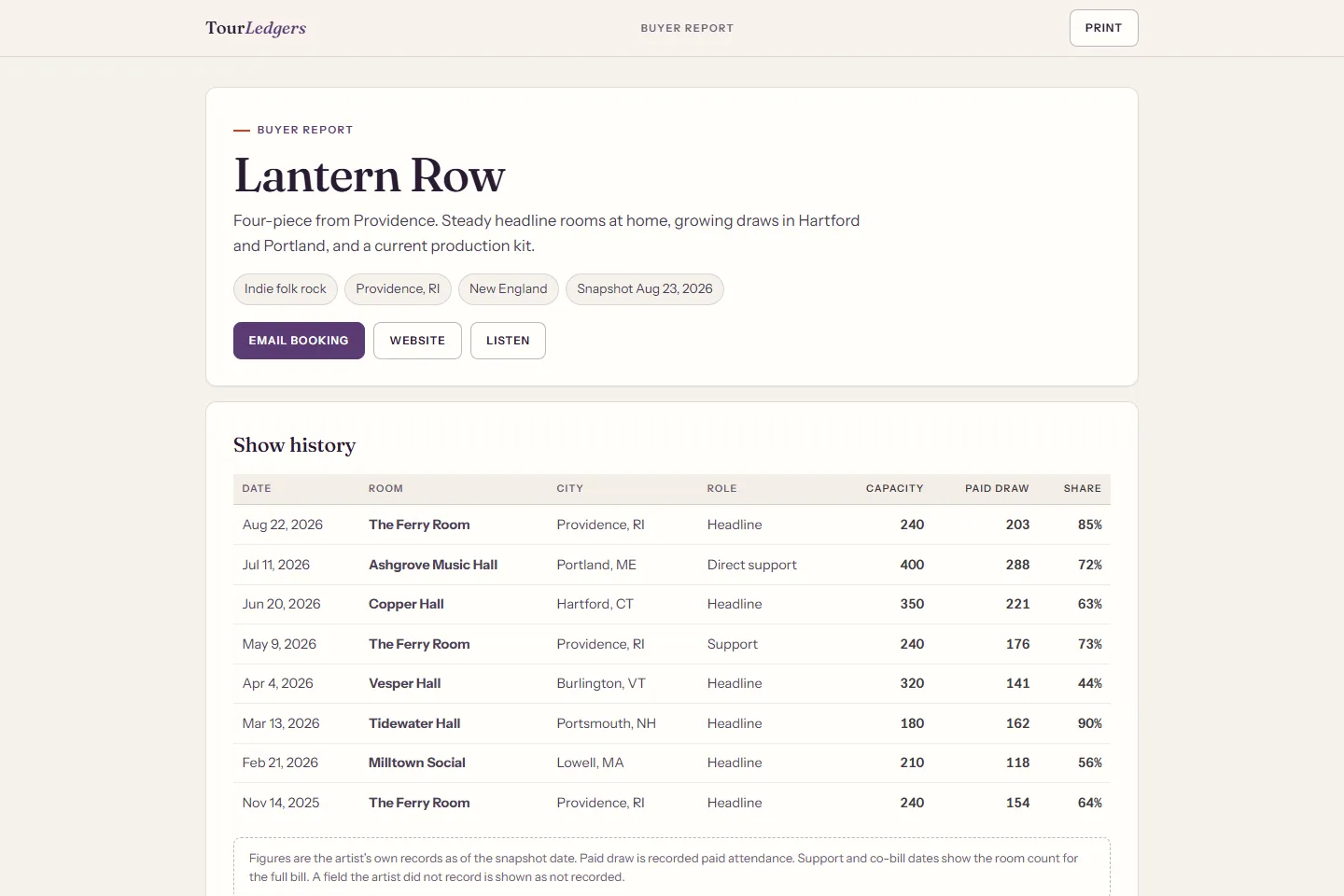
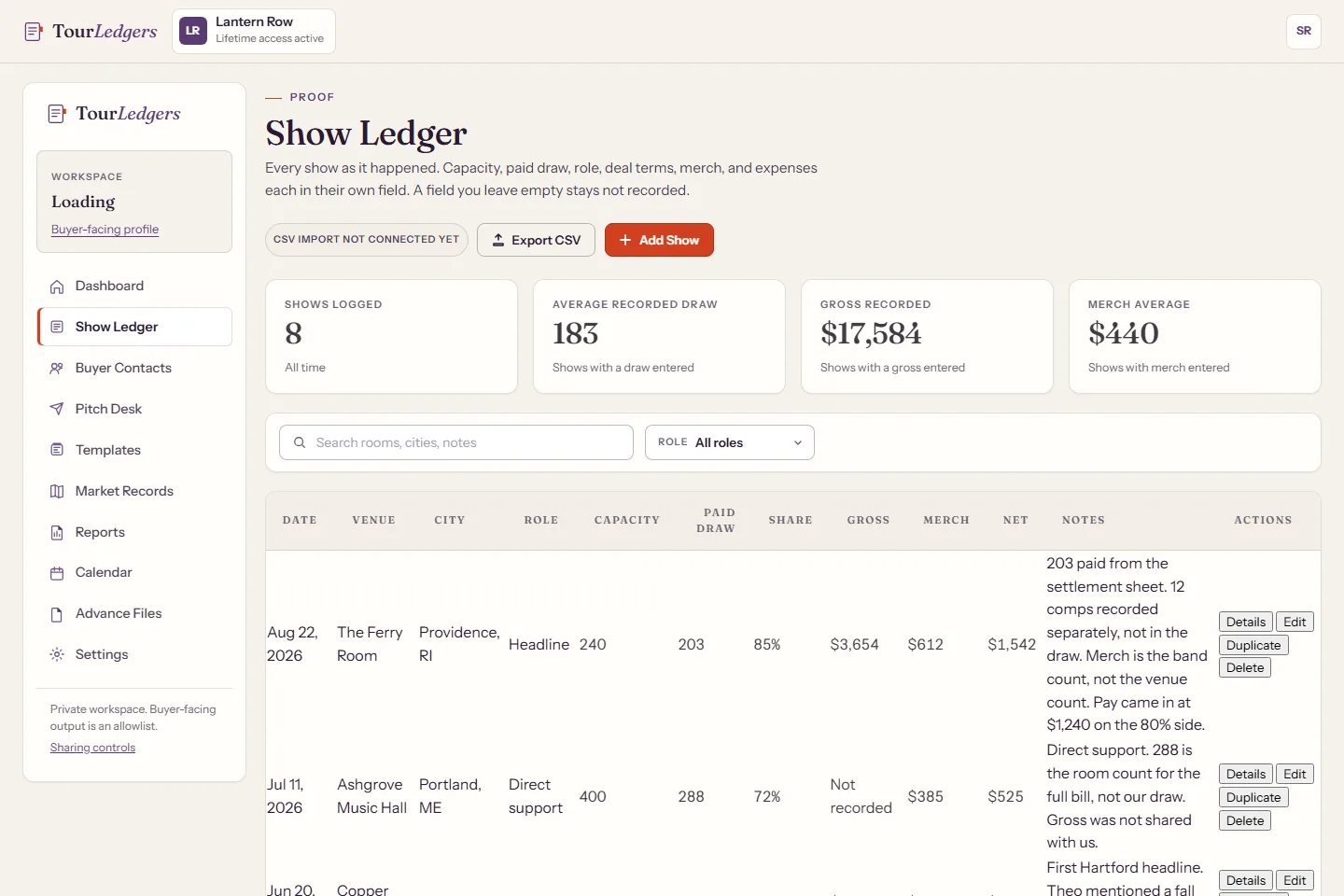
The workspace on the left. What a buyer receives on the right.
Both captures come from the sample workspace for the fictional artist Lantern Row. The ledger holds every figure. The report shows only allowlisted fields.
One record, from proof to pitch.
Follow one fictional show through the product: recorded, kept with its buyer, turned into a pitch, matched with the right file, and checked against the market and the buyer-facing output.
Sample dataSample data. Lantern Row is a fictional artist. Every venue, buyer, and figure is invented for this demonstration.
Record the completed show
August 22 at The Ferry Room settled last night. Each figure goes in as what it is: paid draw from the settlement sheet, comps in their own line, merch from the band count, expenses from receipts.
- Connects on its own
- Saving the show links it to the buyer you selected. Use Recalculate in Market Records to include it in the Providence averages.
- You do this
- You type the figures. Anything you skip shows as not recorded, never as zero.
Keep the buyer and the notes
Dana asked for a Friday in November and the updated stage plot. Her name, her room, what she asked for, and the follow-up date stay with the show instead of in a text thread.
- Connects on its own
- The follow-up date appears on the calendar and in the pitch queue.
- You do this
- Notes are private to your workspace and never appear on a public page or report.
| Date | Role | Draw | Net |
|---|---|---|---|
| Aug 22, 2026 | Headline | 203 | $1,542 |
| May 9, 2026 | Support (room count) | 176 | $481 |
| Nov 14, 2025 | Headline | 154 | $960 |
Prepare the next pitch from the record
A return follow-up draft pulls the real figures: 203 paid on a 240 cap, the Hartford result since then, the current file status.
- Connects on its own
- Templates fill in artist details, recent show summaries, average draw, and strongest markets from your records.
- You do this
- You copy the draft into your own email and send it there. You mark it sent, viewed, won, or passed yourself. TourLedgers does not send email or track opens.
Hi Dana,
Thank you again for August 22. Our count matched yours: 203 paid on a 240 cap, with 12 comps on the side.
You mentioned a Friday in November. We can hold November 13 or November 20 and bring a local opener. Since the last date, Hartford came in at 221 paid on a 350 cap, so the room count is holding up outside Providence too.
The current stage plot is attached, along with the input list. The tech rider is being refreshed this week and I will send it as soon as it is final.
Booking profile: tourledgers.com/artist/lantern-row/
Best,
Sam, for Lantern Row
booking@lanternrow.example
- From the record 203 paid on a 240 cap
- From the record Hartford 221 paid on a 350 cap
- From the files Stage plot current, tech rider needs update
Pull the approved production file
The stage plot she asked for is current. The tech rider is flagged for an update, so it does not go out until it is refreshed.
- Connects on its own
- File status feeds the readiness list in the workspace and the readiness line on buyer-facing outputs.
- You do this
- Files stay private to your signed-in account. You attach them yourself. Tax and settlement documents never appear on any output.
- Stage plot
- Input list
- Tech rider
- Hospitality rider
- W-9
- Logo pack
- Press photo
- Approved bio
- Live video
Check the market and what the buyer will see
Providence across three shows, then the buyer-facing report built from the allowlist: dates, rooms, capacity, draw, markets played, file readiness. Nothing else.
- Connects on its own
- The report is a snapshot of allowlisted fields with an unlisted link you can turn off at any time.
- You do this
- You decide when to share the link and when to switch it off.
| Date | Room | Cap | Draw |
|---|---|---|---|
| Aug 22, 2026 | The Ferry Room, RI | 240 | 203 |
| Jul 11, 2026 | Ashgrove Music Hall, ME | 400 | 288 |
| Jun 20, 2026 | Copper Hall, CT | 350 | 221 |
| May 9, 2026 | The Ferry Room, RI | 240 | 176 |
- Guarantee and door terms
- Ticket gross
- Merch
- Expenses and net
- Buyer names and emails
- Private notes
- W-9 and settlement files
- Workspace score
Proof, outreach, readiness, markets.
Four working areas, one connected record. Each one is explained by the task it does, with what connects on its own and what stays in your hands.
Every show becomes a usable record.
Log the show while the settlement is still in your hand. Capacity, paid draw, comps, support slots, guarantees, door terms, merch, and expenses each get their own field, so the record says what actually happened.
- Log capacity, paid draw, and comps as separate figures
- Record guarantee, door terms, gross, merch, and expenses as what they are
- Mark support slots so a room count is never read as your draw
- Connects on its own
- A saved show links to the buyer you selected and becomes available to pitch templates and reports. Use Recalculate in Market Records to refresh market averages.
- You do this
- You enter the figures. Nothing is estimated for you, and a field you leave empty shows as not recorded rather than zero.
The buyer, the room, and the follow-up stay together.
Keep the buyer, the last conversation, and the next follow-up date on one card. Draft the next pitch from a template that pulls your real figures instead of rebuilding them from memory.
- Keep the buyer, room, and last conversation on one card
- Set a next follow-up date and see it on the calendar
- Draft a pitch from a template that fills in your average draw and recent shows
- Connects on its own
- Templates fill in artist details, recent show summaries, average draw, and strongest markets from your records.
- You do this
- TourLedgers prepares and tracks pitches. It does not send email and it does not know when a buyer opens a message. You update the status.
The right file is current before anyone asks.
Keep one current copy of every file a buyer or production contact asks for, and know which ones need attention before you send them.
- Upload stage plots, input lists, riders, W-9, logos, photos, bio, and live video
- See which required files are current and which need an update
- Download the current file when a buyer asks for it
- Connects on its own
- File status feeds the readiness list in your workspace and the readiness line on buyer-facing outputs.
- You do this
- Files stay private to your signed-in account. Sending one to a buyer is something you do by attaching it. There are no public file links.
See how each city has actually gone for you.
Shows played, average draw, capacity share, and the routing note you left last time, city by city, so a return decision uses the same figures every time.
- Recompute market records from your own shows
- Compare average draw and capacity share by city
- Keep a private routing note per market
- Connects on its own
- Market records are computed from your show ledger when you ask for a recalculation.
- You do this
- Routing notes and return decisions are yours. There is no outside market data, only your own history.
Private record on the left. Buyer-facing output on the right.
A buyer-facing page is built from an allowlist, not from a copy of your workspace. Only fields on the list can appear, so a report never leaks a guarantee, a merch figure, a buyer email, or a note.
- SharedArtist name, genre, hometown, market, and short bio
- SharedBooking email and the links you chose to publish
- SharedShow date, room, city, role, capacity, and paid draw
- SharedMarkets played with shows played and average draw
- SharedWhether production files are current
- PrivateGuarantees, door terms, gross, merch, expenses, and net
- PrivateBuyer names, emails, temperatures, and notes
- PrivatePrivate show notes and routing notes
- PrivateW-9, settlement, and contract files
- PrivateThe workspace score and its breakdown
- IncludedArtist name, genre, hometown, market, and short bio
- IncludedBooking email and the links you chose to publish
- IncludedShow date, room, city, role, capacity, and paid draw
- IncludedMarkets played with shows played and average draw
- IncludedWhether production files are current
- Guarantees, door terms, gross, merch, expenses, and net
- Buyer names, emails, temperatures, and notes
- Private show notes and routing notes
- W-9, settlement, and contract files
- The workspace score and its breakdown
Built for the people carrying the booking work.
The independent side of touring: artists and small teams that need a clear operating record without another disconnected tool.
Self-booking artists
One place for the outreach, the show record, and the follow-up you are already doing between shows.
Working bands
One current set of advance files and one show history the whole band can trust.
Managers and small teams
A repeatable way to keep an artist record clear, current, and ready to share.
Artists growing regionally
The structure that turns scattered dates into a market-by-market booking record.
One price. Lifetime access.
One payment of $300. No monthly subscription, no per-user charges, no add-on tiers. Every product area is included.
Does TourLedgers book shows for me?+
No. TourLedgers is operating software, not a booking agency. It helps you organize the proof, contacts, files, and follow-up behind your booking work.
Is TourLedgers a monthly subscription?+
No. TourLedgers is a single $300 payment for lifetime access, with no recurring subscription.
How many people can use one account?+
One login per account today. Team invitations are not available yet. There are no per-user charges because there are no extra users to charge for.
Can buyers see my numbers?+
Not unless you put them in a message yourself. Public pages and report links use an allowlist: date, room, city, role, capacity, and paid draw for shows, market averages, and whether production files are current. Guarantees, gross, net, merch, expenses, buyer contacts, notes, and tax documents are never included.
TourLedgers Lifetime
- No monthly subscription
- No per-user charges
- Every product area included
Secure checkout through Stripe. Payment confirmation activates the account.
Sample data. Lantern Row is a fictional artist. Every venue, buyer, and figure is invented for this demonstration.